Solving the Emoji Storage Problem in MySQL
While developing a Flutter application, I ran into a problem storing emoji in a MySQL database. Here I’ll share what went wrong and how I worked through it.
The Problem
In the Flutter app, I built a feature that saves emoji selected with the emoji_picker library to a MySQL database. However, certain emoji — especially compound emoji — weren’t being stored correctly.
For example, when I saved the family emoji 👨👩👧👧, the database ended up with only part of it, something like 👩👦.
The initial database column was set up like this:
Name: emoji
Type: varchar(4)
Character Set: utf8mb4
Collation: utf8mb4_general_ci
The emoji displayed correctly on the client, but when I reloaded the data from the server, it had changed. Checking the server logs, I confirmed that the emoji reached the server intact — it was being mangled during the process of saving it to MySQL.
Investigating the Cause and Working Toward a Fix
1. Understanding MySQL’s UTF-8 Encoding
MySQL’s UTF-8 implementation differs somewhat from the standard. MySQL’s ‘utf8’ character set actually supports only up to 3 bytes per character. Three bytes is enough for most common characters, but some Unicode characters — like emoji — require 4 bytes.
To store these 4-byte characters, you need to use the ‘utf8mb4’ character set. Here, ‘mb4’ stands for ‘multi-byte 4’, meaning it can store up to 4 bytes per character.
Since I was already using utf8mb4, however, I concluded that the cause lay elsewhere.
2. Reviewing the Collation
The next thing I considered was whether the collation (character sorting rules) might be the problem. I looked into changing utf8mb4_general_ci to utf8mb4_unicode_ci.
The main differences between the two:
utf8mb4_general_ci: A fast sorting method optimized for an era when CPU performance was limitedutf8mb4_unicode_ci: A more accurate sorting method based on the Unicode standard
On modern systems, the performance difference between the two is negligible, and since unicode_ci provides more accurate sorting, it’s the preferred choice these days. But in my tests, changing the collation didn’t fix the problem.
3. Verifying the Byte Size
Finally, I investigated how many bytes the emoji actually occupied.
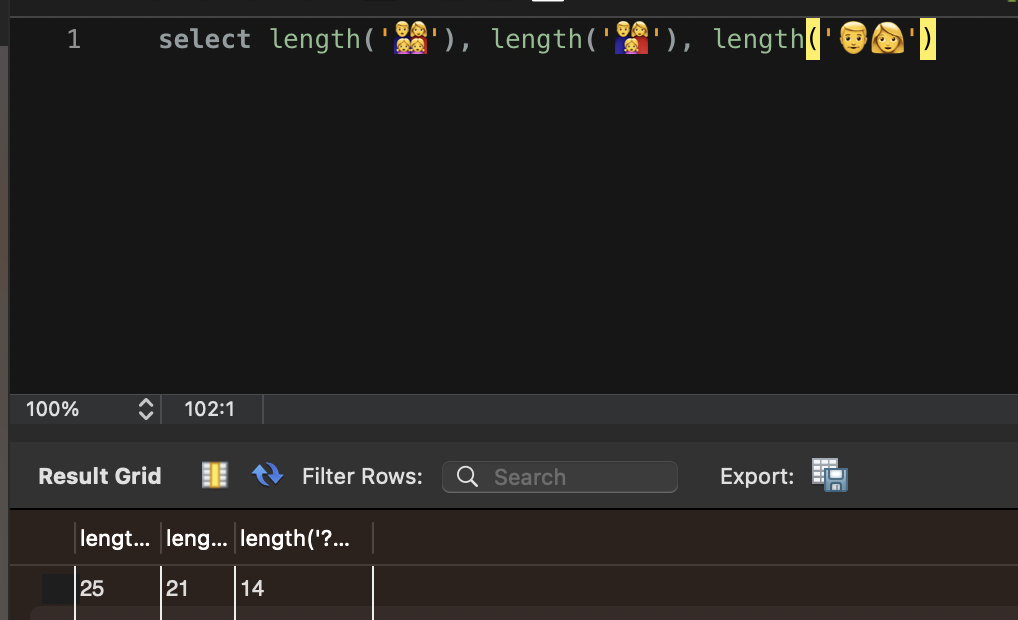
The family emoji (👨👩👧👧) took up 25 bytes, and other compound emoji took up 21 bytes, 14 bytes, and so on — a considerable amount of space.
Here’s what I found when I checked the actual storage capacity of VARCHAR(4):
I confirmed that VARCHAR(4) can store up to 16 bytes, and VARCHAR(8) up to 32 bytes.
VARCHAR(4) counts each character as up to 4 bytes, so it can store only 16 bytes in total. A 25-byte emoji was therefore bound to be truncated. In fact, I confirmed that storing a large emoji produced the error ERROR 1265: Data truncated for column 'emoji' at row 1.
The Solution
I modified the database schema, changing the emoji column’s type from VARCHAR(4) to VARCHAR(8). This allowed storage of up to 32 bytes, and compound emoji were then saved without any issues.
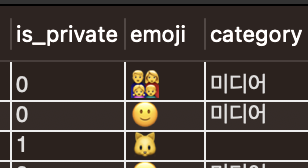
After the change, I could confirm that all emoji were being stored correctly.
Conclusion and Takeaways
This experience taught me a few important things about MySQL’s character encoding and storage behavior:
- MySQL’s default utf8 encoding supports only up to 3 bytes per character, so 4-byte characters like emoji require utf8mb4.
- In VARCHAR(n), n simply refers to the number of characters, but the actual storage space varies depending on the character set in use.
- A compound emoji may look like a single character, but internally it’s a combination of multiple code points and can take up a substantial number of bytes.
When storing Unicode characters including emoji in a database, it’s important to secure enough storage space. Setting the VARCHAR size generously and using an appropriate character set (utf8mb4) will prevent most problems.