Making a Todo List App with Clean Architecture and GetX
Getting Started
These days, building an app usually means reaching for various architectures and design patterns. Ultimately, I think they’re tools we use to improve maintainability and code readability of a service.
That said, personally I don’t really recommend learning about architecture when you’re just starting out with app development. Back when I first learned Flutter, I remember cramming all the Widgets into the Screen and only separating out the Model. At that point, even building the view itself wasn’t easy, and design patterns only became necessary once I’d grown comfortable creating those views. Now I’ve come to think architecture is knowledge worth having, so I’m studying it, but looking back, most of the toy projects I’ve built so far didn’t really need it. So I’d recommend this post not to people just learning Flutter, but to those who have some experience building apps and have already thought about the different ways to implement various architectures.
Building the Service
To be honest, I didn’t go research Clean Architecture just to write this post; this was something I built as a take-home assignment when applying to a company. I’m writing it to share the thoughts that crossed my mind while coding, so there may be incorrect parts and there may be incomplete parts.
GetX
GetX is one of the state management libraries available in Flutter. Beyond it, there are libraries like Provider, Riverpod, and Bloc. Among them, I’ll be using GetX to build a todo list.
Across the various Flutter communities, there’s always a recurring debate where opinions clash over whether GetX is bad or actually great. What I felt while building a service is that GetX itself seems fine. I think it’s a library that applies the Observer pattern well, but the downside is that for a single state management library, it lets you bring in too much (routing, modals, DI, and so on), and in the end having the service itself depend entirely on a single package isn’t great. On top of that, it can be set up to ignore the context that Flutter intends you to use well and operate independently instead, which carries the risk of developing bad coding habits. (Having entered Flutter through GetX myself, going back to the basics now turned out to be a hard experience because I started from one.)
Clean Architecture
Flutter’s state management libraries each seem to have a design pattern that pairs well with them.
In my opinion, GetX doesn’t really need much in the way of other design patterns, and just introducing something like Clean Architecture seemed fine, so I gave it a try.
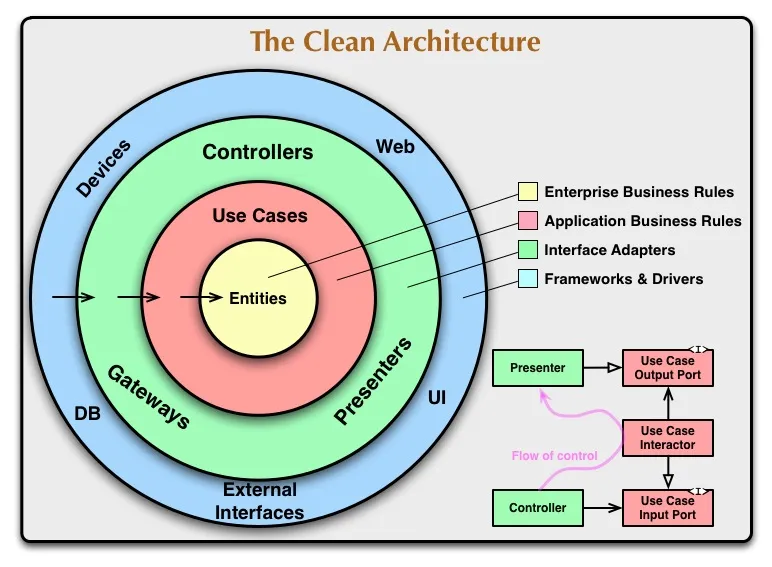
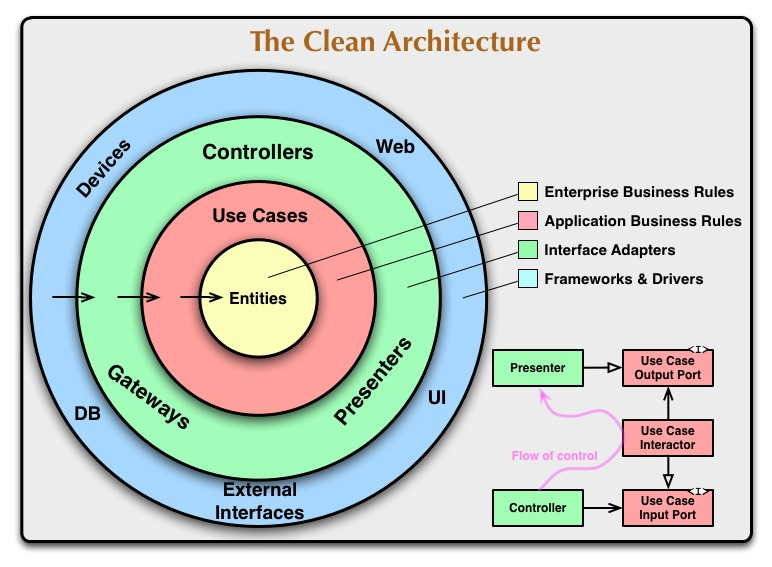 You can think of Clean Architecture as an architecture that splits logic across layers to separate concerns, making the code more maintainable and readable.
For example, the part that actually touches data (local DB, API calls, etc.) is the Entity, the UseCases wrap around it, and the Presenters make use of those UseCases.
You can think of Clean Architecture as an architecture that splits logic across layers to separate concerns, making the code more maintainable and readable.
For example, the part that actually touches data (local DB, API calls, etc.) is the Entity, the UseCases wrap around it, and the Presenters make use of those UseCases.
Folder Structure
lib
 ┣ data
 ┃ ┣ datasources
 ┃ ┃ ┗ todo_local_datasource.dart
 ┃ ┗ repositories
 ┃ ┃ ┗ todo_repository_impl.dart
 ┣ domain
 ┃ ┣ entities
 ┃ ┃ ┣ todo_entity.dart
 ┃ ┃ ┗ todo_entity.g.dart
 ┃ ┣ repositories
 ┃ ┃ ┗ todo_repository.dart
 ┃ ┗ usecases
 ┃ ┃ ┣ get_todos.dart
 ┃ ┃ ┗ save_todos.dart
 ┣ presentation
 ┃ ┣ controllers
 ┃ ┃ ┗ todo_controller.dart
 ┃ ┣ pages
 ┃ ┃ ┣ edit_todo_page.dart
 ┃ ┃ ┗ todo_page.dart
 ┃ ┗ widgets
 ┃ ┃ ┗ todo_widget.dart
 ┣ routes
 ┃ ┗ routes.dart
 ┗ main.dart
When I first learned it, it was such an abstract concept that I agonized over how best to implement it, so I wrote this post thinking it would help to have some example code to reference.
The data Layer
todo_local_datasource.dart I implemented this to load information from the actual local DB.
import 'package:flutter_todo_example/domain/entities/todo_entity.dart';
import 'package:hive/hive.dart';

class TodoLocalDataSource {
  final String _boxName = 'todos';
  Future<Box<TodoEntity>> get _todosBox async => await Hive.openBox(_boxName);

  Future<List<TodoEntity>> getTodos() async {
    final box = await _todosBox;
    return box.values.toList();
  }

  Future<void> saveTodos(List<TodoEntity> todos) async {
    final box = await _todosBox;
    for (final todo in todos) {
      await box.put(todo.id, todo);
    }
  }
}
todo_repository_impl.dart This is the concrete implementation of the repository.
import 'package:flutter_todo_example/data/datasources/todo_local_datasource.dart';
import 'package:flutter_todo_example/domain/entities/todo_entity.dart';
import 'package:flutter_todo_example/domain/repositories/todo_repository.dart';

class TodoRepositoryImpl implements TodoRepository {
  final TodoLocalDataSource localDataSource;

  TodoRepositoryImpl(this.localDataSource);

  @override
  Future<List<TodoEntity>> getTodos() {
    return localDataSource.getTodos();
  }

  @override
  Future<void> saveTodos(List<TodoEntity> todos) {
    return localDataSource.saveTodos(todos);
  }
}
The domain Layer
todo_entity.dart I modeled this in a way that allows serialization.
import 'package:hive/hive.dart';

part 'todo_entity.g.dart';

@HiveType(typeId: 0)
class TodoEntity {
  @HiveField(0)
  final String id;
  @HiveField(1)
  final String title;
  @HiveField(2)
  final bool isCompleted;

  TodoEntity(this.id, this.title, this.isCompleted);

  TodoEntity copyWith({String? id, String? title, bool? isCompleted}) {
    return TodoEntity(
      id ?? this.id,
      title ?? this.title,
      isCompleted ?? this.isCompleted,
    );
  }
}
todo_repository.dart This defines the interface for the repository in the data layer.
import 'package:flutter_todo_example/domain/entities/todo_entity.dart';

abstract class TodoRepository {
  Future<List<TodoEntity>> getTodos();
  Future<void> saveTodos(List<TodoEntity> todos);
}
get_todos.dart
Here Dart’s unusual call() syntax shows up, which is set up so you can invoke a class as if it were a function.
This way, after receiving the repository, the part that actually runs comes into play.
import 'package:flutter_todo_example/domain/entities/todo_entity.dart';
import 'package:flutter_todo_example/domain/repositories/todo_repository.dart';

class GetTodos {
  final TodoRepository repository;

  GetTodos(this.reposity);

  Future<List<TodoEntity>> call() async {
    return await reposity.getTodos();
  }
}
The presentation Layer
todo_page.dart Using GetX, I was able to write cleaner code with obx.
import 'package:flutter/material.dart';
import 'package:flutter_todo_example/domain/entities/todo_entity.dart';
import 'package:flutter_todo_example/domain/usecases/get_todos.dart';
import 'package:flutter_todo_example/domain/usecases/save_todos.dart';
import 'package:flutter_todo_example/presentation/controllers/todo_controller.dart';
import 'package:flutter_todo_example/presentation/pages/edit_todo_page.dart';
import 'package:flutter_todo_example/presentation/widgets/todo_widget.dart';
import 'package:get/get.dart';

class TodoPage extends StatelessWidget {
  const TodoPage({super.key});

  @override
  Widget build(BuildContext context) {
    return GetBuilder<TodoController>(
        init: TodoController(Get.find<GetTodos>(), Get.find<SaveTodos>()),
        builder: (controller) {
          return DefaultTabController(
            length: 2,
            child: Scaffold(
              appBar: AppBar(
                title: const Text('Todo'),
                bottom: const TabBar(
                  tabs: [
                    Tab(text: 'Todo', icon: Icon(Icons.list)),
                    Tab(text: 'Done', icon: Icon(Icons.check)),
                  ],
                ),
                actions: [
                  IconButton(
                    onPressed: () {
                      controller.textEditingController.clear();
                      Get.to(() => const EditTodoPage());
                    },
                    icon: const Icon(Icons.add),
                  ),
                ],
              ),
              body: TabBarView(children: [
                Obx(() {
                  final inProgressTodos =
                      controller.todos.where((t) => !t.isCompleted).toList();
                  return _buildTodoList(inProgressTodos);
                }),
                Obx(() {
                  final completedTodos =
                      controller.todos.where((t) => t.isCompleted).toList();
                  return _buildTodoList(completedTodos);
                })
              ]),
            ),
          );
        });
  }

  Widget _buildTodoList(List<TodoEntity> todos) {
    return ListView.builder(
      itemCount: todos.length,
      itemBuilder: (context, index) {
        final todo = todos[index].obs;
        return TodoWidget(todo: todo, key: Key(todo.value.id));
      },
    );
  }
}
todo_controller.dart By declaring the GetX controller related to todos, the data used internally is managed in memory.
import 'package:flutter/material.dart';
import 'package:flutter_todo_example/domain/entities/todo_entity.dart';
import 'package:flutter_todo_example/domain/usecases/get_todos.dart';
import 'package:flutter_todo_example/domain/usecases/save_todos.dart';
import 'package:get/get.dart';

class TodoController extends GetxController {
  final GetTodos getTodos;
  final SaveTodos saveTodos;
  final textEditingController = TextEditingController();

  TodoController(this.getTodos, this.saveTodos);

  final todos = <TodoEntity>[].obs;

  @override
  void onInit() {
    super.onInit();
    loadTodos();
  }

  Future<void> loadTodos() async {
    final result = await getTodos();
    todos.value = result;
    update();
  }

  void addTodo(TodoEntity todo) {
    todos.add(todo);
    saveTodos(todos);
    textEditingController.clear();
    update();
  }

  void toggleIsCompleted(TodoEntity todo) {
    final index = todos.indexWhere((element) => element.id == todo.id);
    todos[index] = todo.copyWith(isCompleted: !todo.isCompleted);
    saveTodos(todos);
    update();
  }

  void editTodo(TodoEntity todo) {
    final index = todos.indexWhere((element) => element.id == todo.id);
    todos[index] = todo;
    saveTodos(todos);
    textEditingController.clear();
    update();
  }
}
Closing Thoughts
Earlier I’d started feeling like using GetX was making my coding skills worse, so lately I’ve been using Provider a lot, but GetX is definitely good for building services quickly. Of course, what’s nice is that it’s that intuitive, and that with obx you can build things up out of StatelessWidgets. I also found that with Clean Architecture, the code is separated across layers, which made readability much higher.
Example Github
Link to the example repository