Jagyeongdan
Jagyeongdan: a fan-made real-time filter camera for Silica Gel
Jagyeongdan is an iOS and Android camera app that shows the VFX from a concert’s stage screens through your own phone camera, in real time. I did everything myself, from planning and development to release and promotion, and on launch day it reached #8 in the Photo & Video category of the Korean App Store.
This is an unofficial fan-made app, not affiliated with Silica Gel or their label.
- Period: Sep 2026 – present (first commit Sep 28, released Oct 2)
- Role: Solo developer (iOS, Android, landing page, promo videos)
- iOS: SwiftUI, AVFoundation, Core Image, Metal, Core ML, ARKit
- Android: Jetpack Compose, CameraX, OpenGL ES 3, LiteRT (NPU via QNN on Snapdragon)
- Links: App Store · Google Play · Landing page
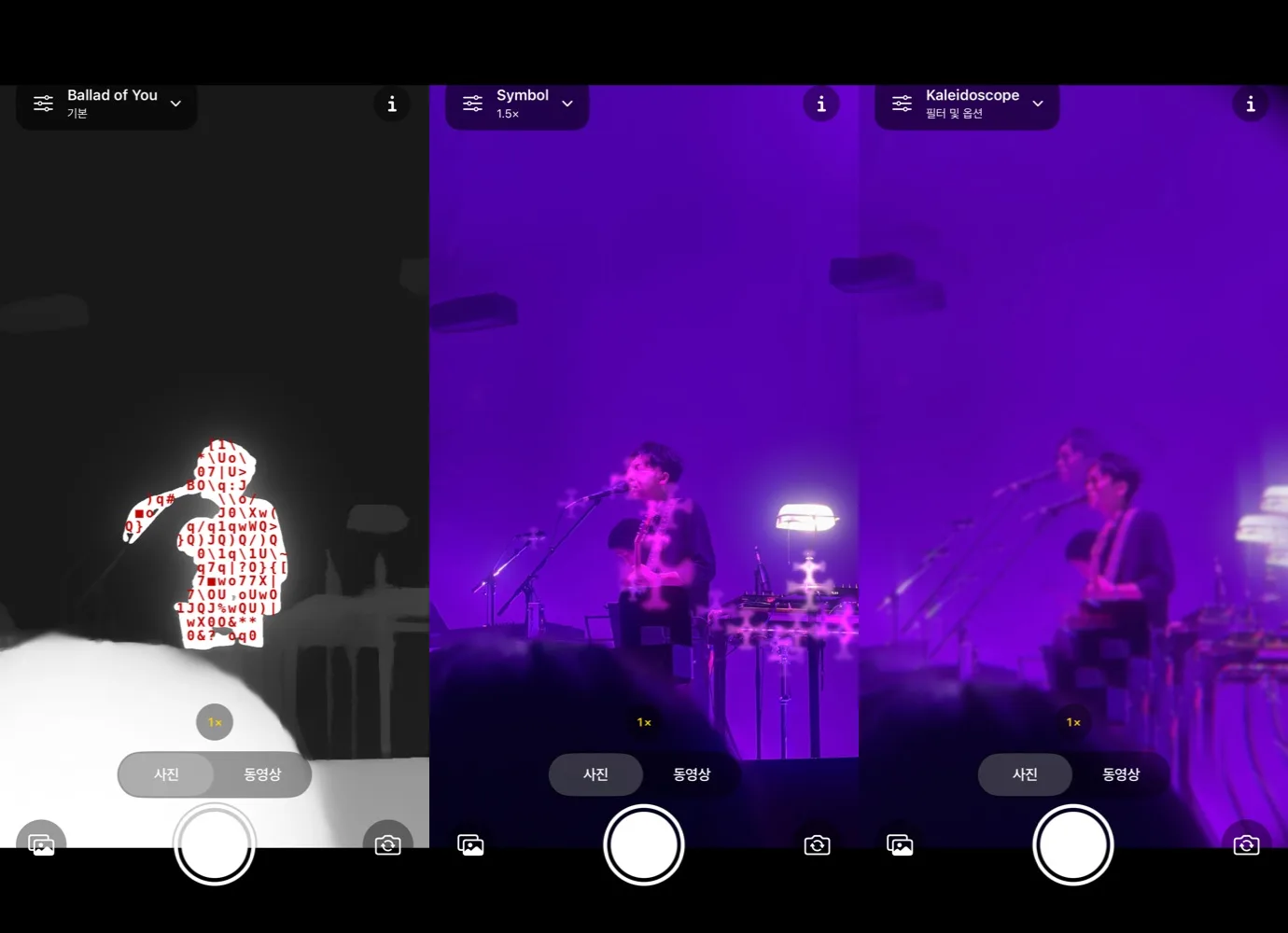
| Ballad of You | Symbol | Kaleidoscope |
|---|---|---|
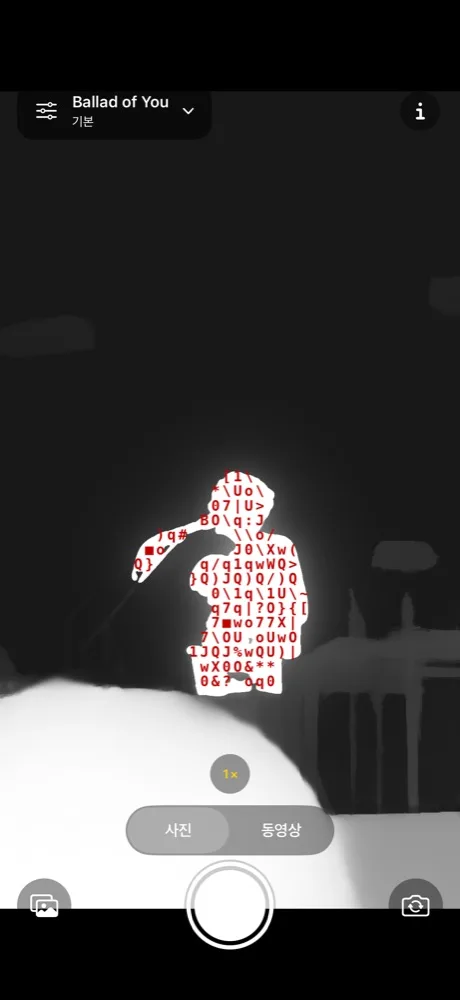 | 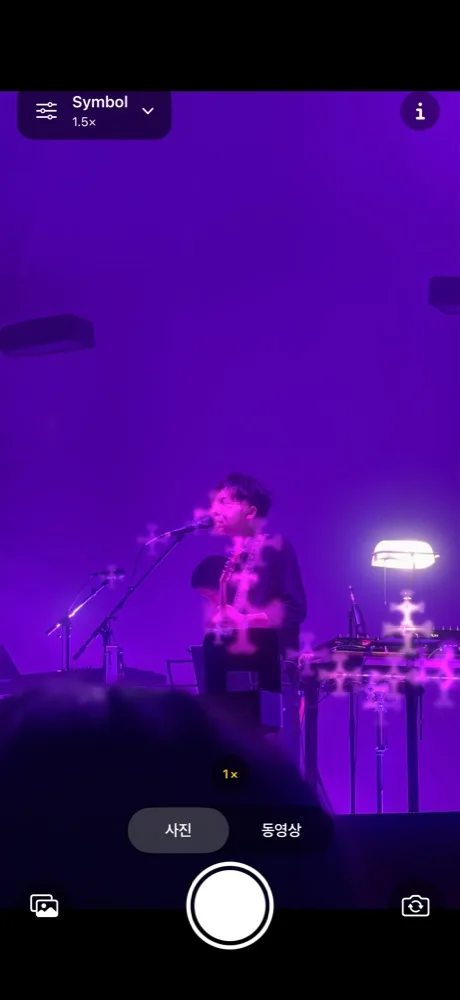 | 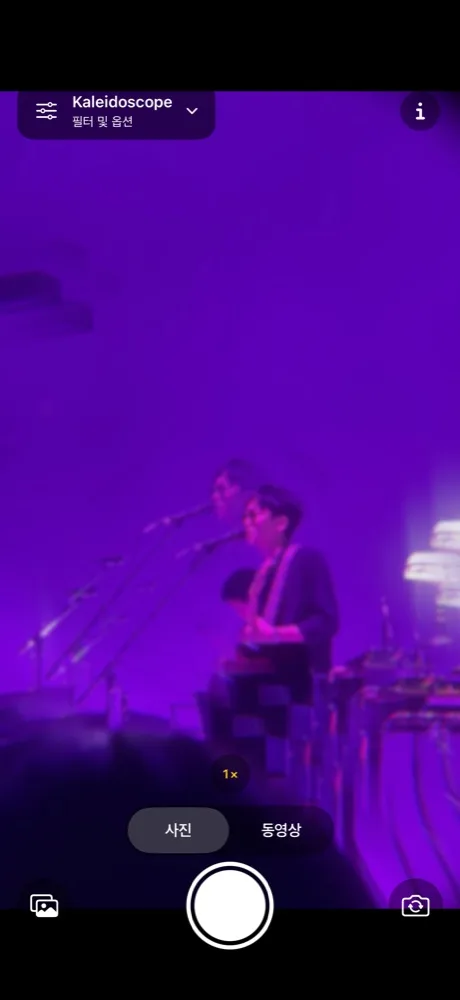 |
| Fills people with text and draws the background in grayscale shading by depth | Adds band-symbol-shaped bokeh and light bloom to bright light sources | Refracts and layers the scene as if a crystal were held in front of the lens |
Background and technical choices
It started at a Silica Gel concert in September 2026: the stage VFX impressed me enough that I wanted to build something like it. The app’s name, “Jagyeongdan,” comes from the name of Silica Gel’s fandom.
Instead of Flutter, my main stack, I built both iOS and Android natively. I’ve long thought that performance-critical services should be native from the start, and native also seemed better for customizing the screen exactly the way I wanted. With AI handling the low-level code, I didn’t need to read every line of it myself, so I judged that the mobile knowledge I’d built up would be enough.
Key implementation
The first version took 3 days on iOS and 2 days to port to Android. Two days after the first commit (Sep 28) the iOS 1.0.0 build was done, and it shipped on Oct 2. Android followed with the same structure moved to Jetpack Compose, CameraX, and OpenGL ES shaders. It runs entirely on-device, with no external packages or API keys.
Every frame is drawn with its own outline. If person segmentation lags by even a frame or two, the text outline trails behind the body like a ghost. To prevent that, the capture queue never blocks waiting on the model, and frames are drawn in capture order once their mask is ready. If a mask doesn’t arrive within 40ms, the frame is drawn with the most recent mask and the fallback is counted. The preview is about 30ms behind, but the outline never drifts, and photo capture and video recording use the same frames.
Three models, each with its own job.
| Model | Role | iPhone 14 Pro |
|---|---|---|
| PP-MattingV2 | Person matting precise down to the gaps between fingers | 11ms, every frame |
| LR-ASPP | Filters non-person fragments like lights and speakers out of the matte | 3.5ms, every other frame |
| Depth Anything V2 Small | Background shading on devices without a depth sensor | 16ms, 6–7 times per second |
Devices with LiDAR or TrueDepth use sensor depth directly. A larger matte input (512×896) gave better outlines, but the thermal state hit serious after 131 seconds, so it didn’t ship.
On Android, precision is chosen per device. Snapdragon 8 Gen 1 and later run inference on the Hexagon NPU; other devices use GPU and CPU. On a Galaxy Z Flip4 the matting model took 25.7ms at fp16, so I applied static int8 quantization and got it down to 14.9ms. LR-ASPP was faster at int8 (4.1ms) but missed distant people on stage, so it stayed at fp16. For the depth model, shrinking the input from 392×518 to 266×350 cut inference from 96ms to 26ms.
When the device heats up, the least important work goes first. As temperature rises, depth estimation and LR-ASPP run less often to hold 30fps; if the heat continues, the frame rate steps down to 24fps and then 15fps to stay stable.
The app kept growing after launch. I added library conversion (applying filters to existing photos and videos), three Ballad of You styles, twelve concert ticket templates, a spray feature that paints the symbol on walls using LiDAR, and a macOS app compiled from the same iOS filter engine. By Nov 16, 2026, that was 350 commits and 10 versions (v1.0.0 → v1.6.0).
Measuring and improving performance
To avoid tuning by feel, both apps have instrumentation that can be toggled on and off, and the measurements are recorded in the repo’s docs along with date, device, and build.
| Item | Device | Result |
|---|---|---|
| 10 minutes of continuous camera (Ballad of You) | iPhone 14 Pro | 30.0fps average, 29.4fps in the worst second, 0% of frames drawn without their own mask |
| Frame arrival to fully drawn | iPhone 14 Pro | p50 31.5ms, p95 37.6ms |
| Library video conversion (14.6s clip) | iPhone 14 Pro | 48.6s → 22.3s |
| Same conversion (120s clip) | iPhone 14 Pro | 602s → 183s. The thermal state used to rise at 420s; now it never rises |
| Library video conversion (14.6s clip) | Galaxy Z Flip4 | 52.7s → 23.0s, final AP temperature 39°C → 31°C |
Library video conversion got faster by replacing the heavy library model (about 165ms per frame, run every other frame) with the camera’s matting model run on every frame. As a side effect, the outlines of hands and held objects now follow naturally frame by frame. I also converted the same clip three times and verified that the hashes of all 439 frames were identical.
Building it with AI
All of the code was written by AI coding agents (Claude Code, Codex). The agents also researched how to implement each feature and found where to make changes, which is how the iOS app shipped in three days. 1.0.0 started at 39 commits and about 3,500 lines; over 25 working days it grew to 350 commits, about 47,000 lines of Swift and Kotlin, and about 10,800 lines of docs.
My part was setting the criteria and checking on real devices.
- I decided the model lineup and quantization criteria. Which model runs in which role, and how far precision can drop, were my calls. Dropping the large matting model that overheated and the int8 LR-ASPP that missed distant people both came from those criteria.
- I checked edge cases one by one on real devices. A camera app has many cases to cover: device performance, orientation, permission state, heat. I ran adb and simulators and verified each case on the devices I own. 61 commits are fixes based on what I saw on an iPhone 14 Pro, Galaxy Z Flip4, and Galaxy S25.
So I can’t explain every line of the shaders. What I can explain clearly is why the structure is the way it is, what I measured to confirm it, and what I gave up under which criteria.
A feature I chose not to ship
The spray feature shipped only on iPhones with LiDAR. I took a non-LiDAR implementation as far as TestFlight and tried ARCore on a Galaxy S25, but without a depth sensor it couldn’t find plain, textureless walls, and the symbol appeared to float in mid-air. I decided not to ship at that quality; on unsupported devices the feature is disabled with an explanation of why. The conditions for revisiting it and the checks to run are written down in the docs.
Results
- #8 in Photo & Video on the Korean App Store on launch day (Oct 2, 2026).
- 5,480 total downloads. (As of Nov 24, 2026: 4,873 first-time downloads on iOS and iPadOS and 607 new users on Android; overlap between the two stores is not deducted.)
- The launch reel I made myself reached 119K views, 85K accounts, 1,845 shares, and 1,450 saves. (As of Nov 26, 2026; the three promo reels total about 147K views.)
- Silica Gel’s official account and a band member liked the launch reel.
Looking back
This was the first time I saw that making something you love, sincerely, actually reaches people. My side projects had mostly been small tools, and I’d never received this much attention; having an effect on people as an app developer was new to me. On the technical side, I learned that once you turn the feeling of “it’s slow” into numbers, deciding what to give up and what to protect gets much easier.